

CutStock
Minimize waste. Maximize every board, bar, and panel.
Enter parts, choose material, optimize — CutStock calculates the best cutting plan in seconds. For panels and bars, with grain direction and blade kerf. As a desktop app (macOS, Windows) and self-hosted web app (Docker) — no internet required.
Cutting Panels
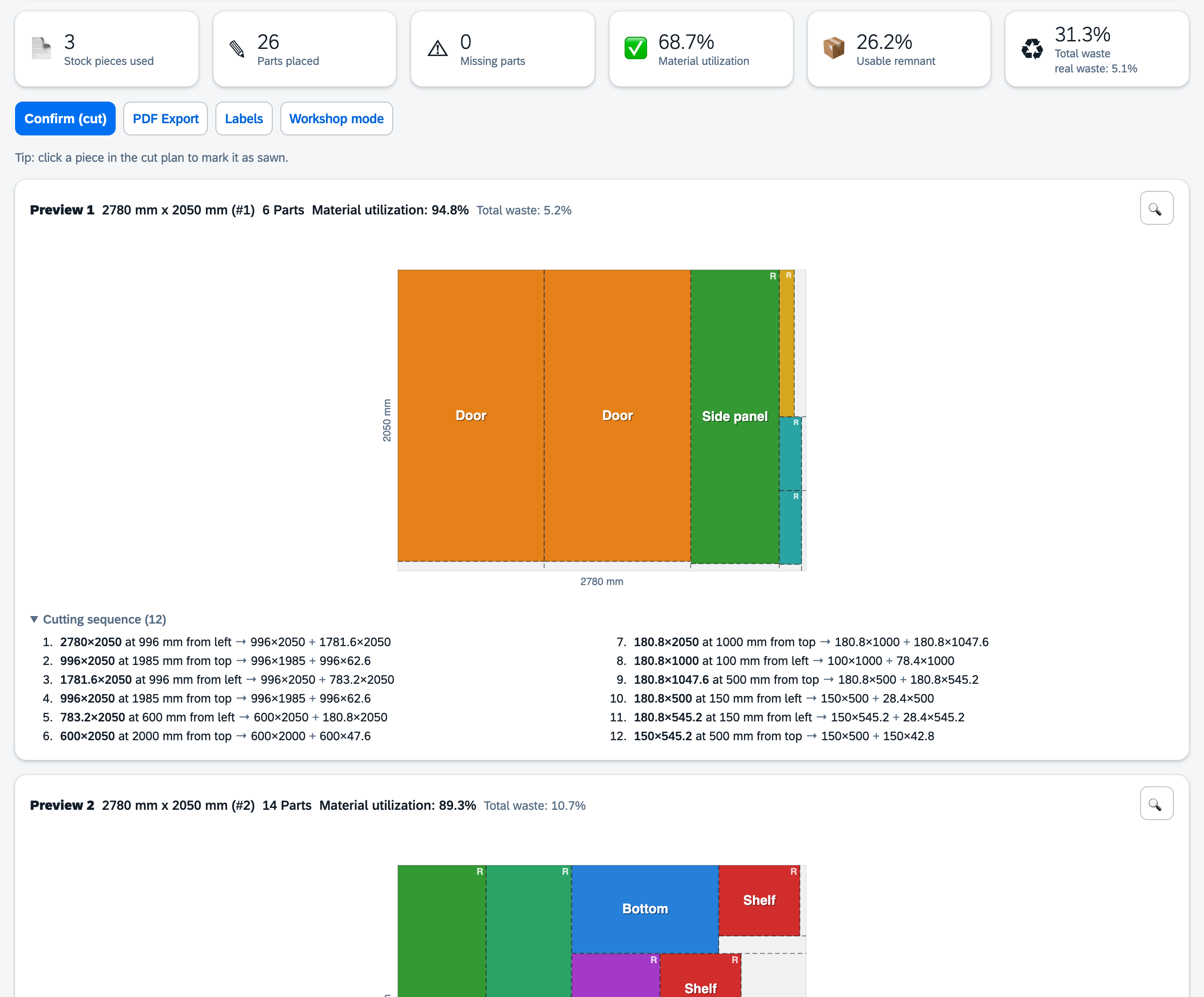
26 parts for a wardrobe, spread across 2800 × 2070 mm chipboard panels? CutStock calculates the cutting plan in seconds — color-coded, with a numbered cutting sequence to follow at the saw. Blade kerf, edge trim and grain direction are included; rotated parts are marked with “R”.
Cutting Bars to Length
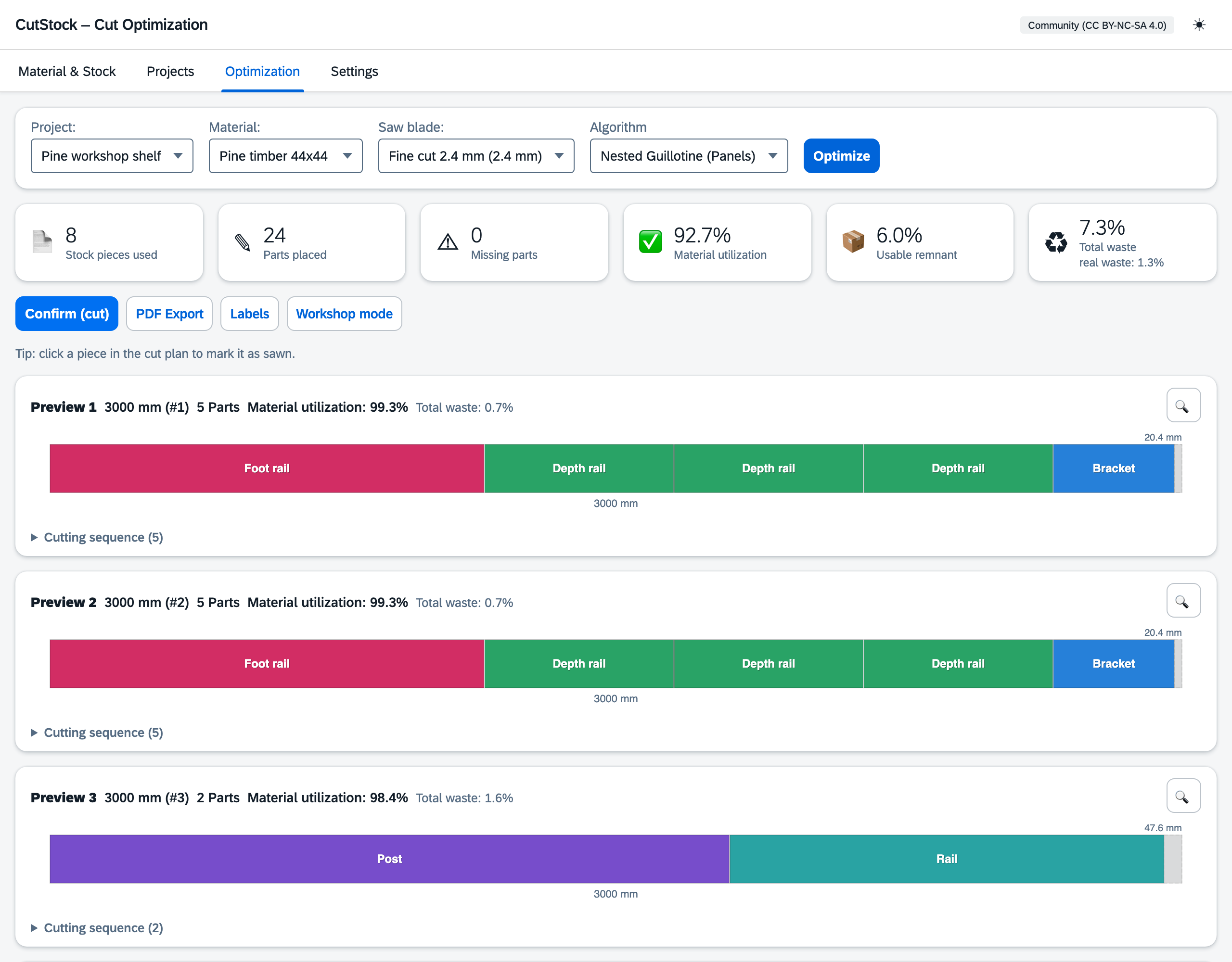
Battens, square timber, tubes, aluminium profiles: for bars, CutStock solves the split exactly as an integer optimization problem (ILP) — so as few bars as possible get cut. Parts on each bar are sorted from long to short, and the remaining offcut is shown with its length.
Not Enough Material? CutStock Creates the Shopping List.
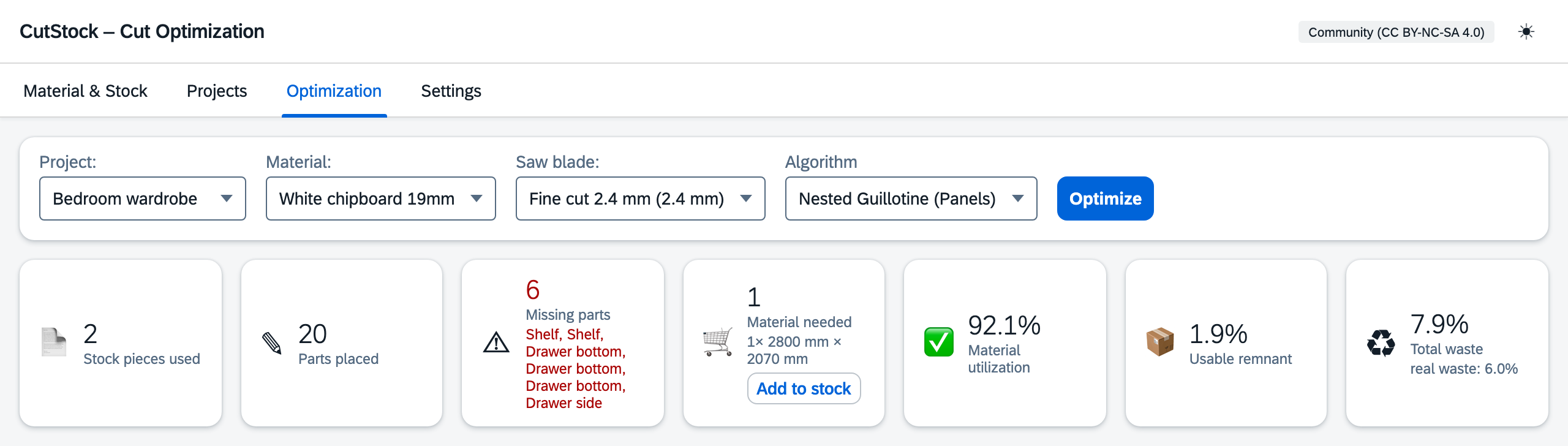
Not enough panels in stock? CutStock instantly shows which parts are missing and how many panels or bars you need for them. One click on “Add to stock” books the requirement in — so you buy exactly what you need.
Features
🪵 Panels and Bars — One Click
Whether chipboard for a wardrobe or square timber for a shelf — CutStock finds the best cutting plan. Offcuts always stay clean rectangles or straight lengths.
🧬 Up to 95 % Material Utilization
Three levels for panels: Fast for a quick overview, Nested Guillotine for smart cut directions, Thorough (genetic algorithm) for maximum yield. Bars are optimized exactly via ILP.
📊 Grain Direction
Respects wood grain per material and per part — lengthwise, crosswise, or any.
🔍 Work Around Defects
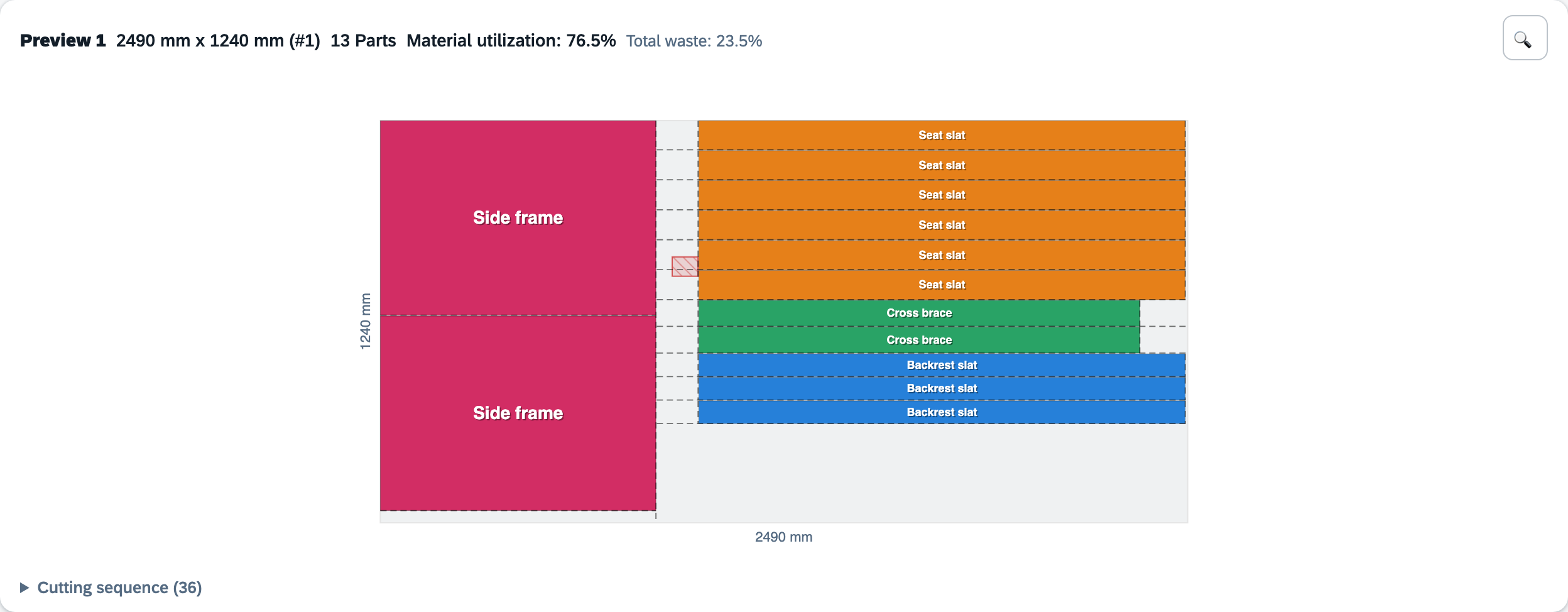
Record knots, cracks and discolorations per board — the optimizer plans around them, and the cut plan shows them hatched in red.
📄 PDF Export
Cut plans with parts list and cutting sequence as PDF — print it and pin it next to the saw.
📋 Cutting Sequence
Numbered step list per panel or bar — precise, blade kerf included. Hover a step to highlight the cut in the plan.
🏷️ Labels
Printable labels for parts and stock pieces — A4 sheets (Avery 3475/L7160) or Dymo/Brother label printers.
🛒 Shopping List at the Push of a Button
Stock not enough? CutStock shows right away what is missing — material, quantity, dimensions. One click adds the requirement to your stock.
🖼️ Material Images
One photo per material — shown as a thumbnail in the material list, enlarged on hover. Find the right wood at a glance.
🐳 Everywhere in the Workshop
Install it on your NAS or home server and CutStock is reachable from every device. Tablet at the saw, laptop for planning, always in sync. No internet required.
📦 Always Know What Is in Stock
Maintain inventory, deduct used pieces automatically, book reusable offcuts back in — as soon as you mark a part as cut.
🔢 Individual Piece Numbering
With 50 identical boards you know exactly which one has the defect: expandable piece list (#1, #2 …) in the stock view, piece number in the cut plan.
📂 Duplicate & Share Projects
Clone projects, copy parts into other projects, export and import as JSON — CutStock creates missing materials on import.
⌨️ Keyboard Shortcuts
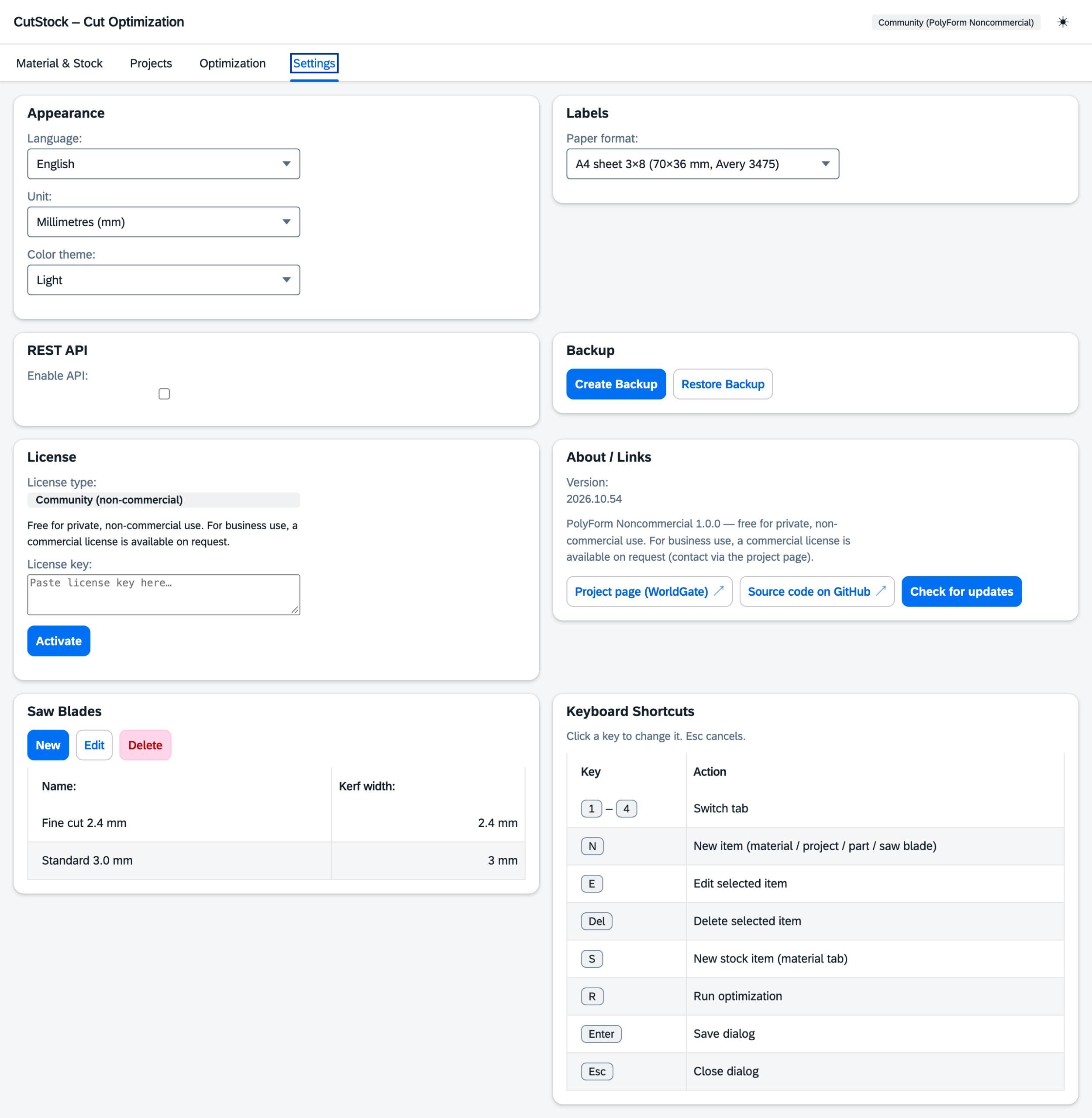
New, Edit, Delete, Stock and Optimize by key — freely assignable: click the key, press the new one.
🌍 Multilingual
Deutsch, English, Français, Italiano. SAP Horizon design in light and dark. macOS, Windows and Docker.
🔨 Tablet at the Saw, Start Cutting
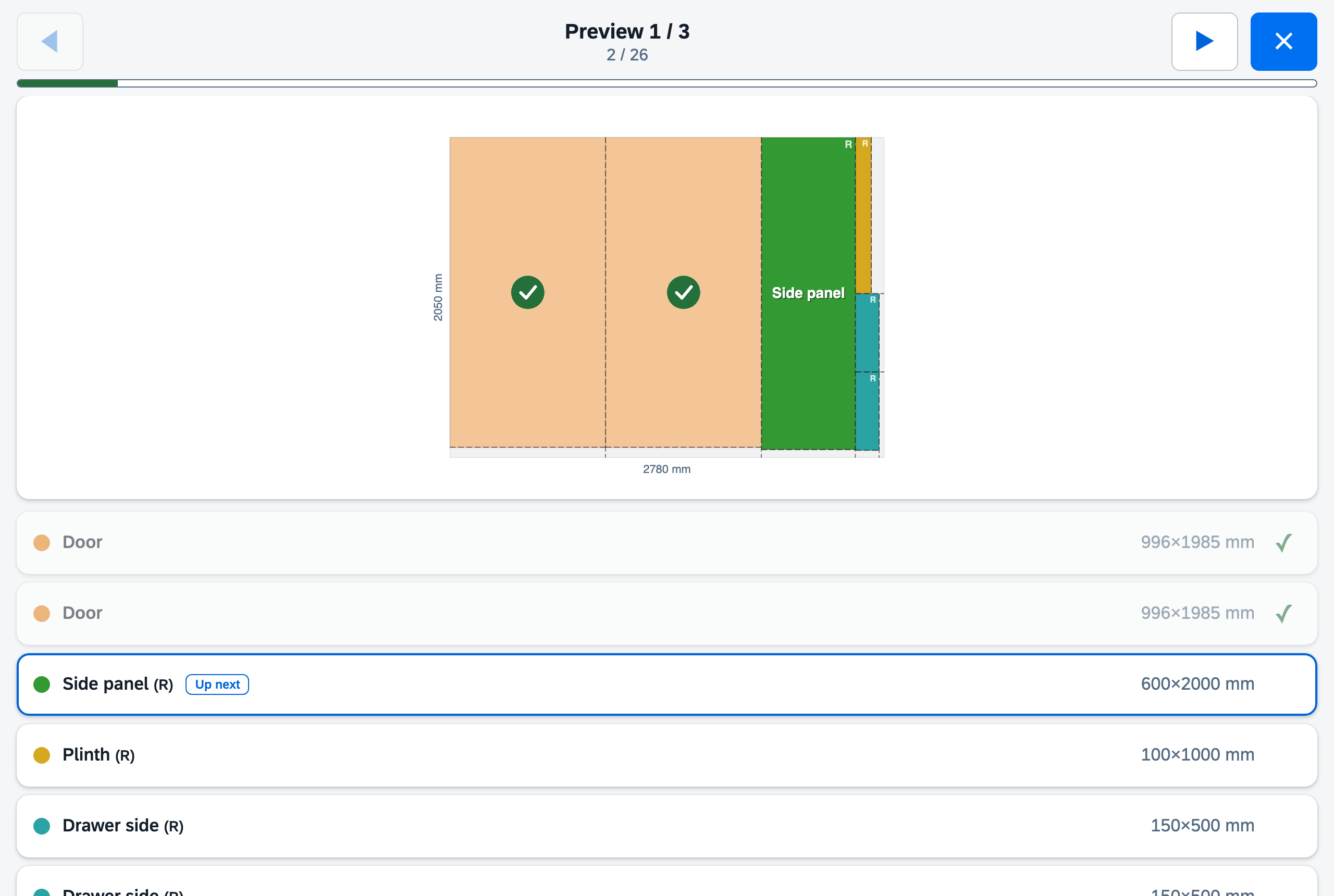
Workshop mode: full screen, large touch buttons, tick off one part after another. Every tick updates progress and stock — no more paper chaos.
📥 CSV Import
Import parts lists from Excel & co. straight into a project — delimiters and columns are detected automatically.
🔌 REST API
Full API for automation, scripts and integrations — optionally secured with an API key (Bearer token).
Materials & Stock
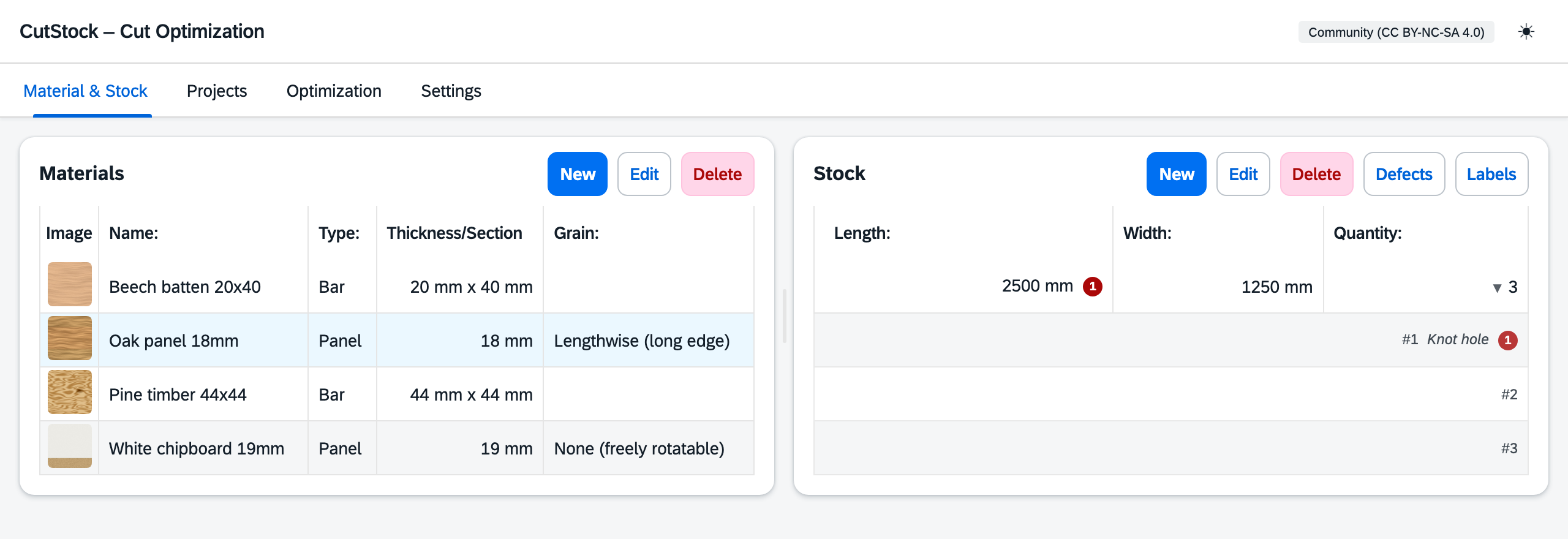
All materials with image, dimensions, grain and stock at a glance. CutStock deducts used pieces when cutting and books reusable offcuts back in. With several identical boards, the expandable piece list shows which board has which defect.
Working Around Defects
Knot hole on board #1? Once recorded, CutStock plans around it: the defect appears hatched in red in the cut plan and no part is placed on it. The piece number in the plan header tells you which board to pull from stock.
Projects
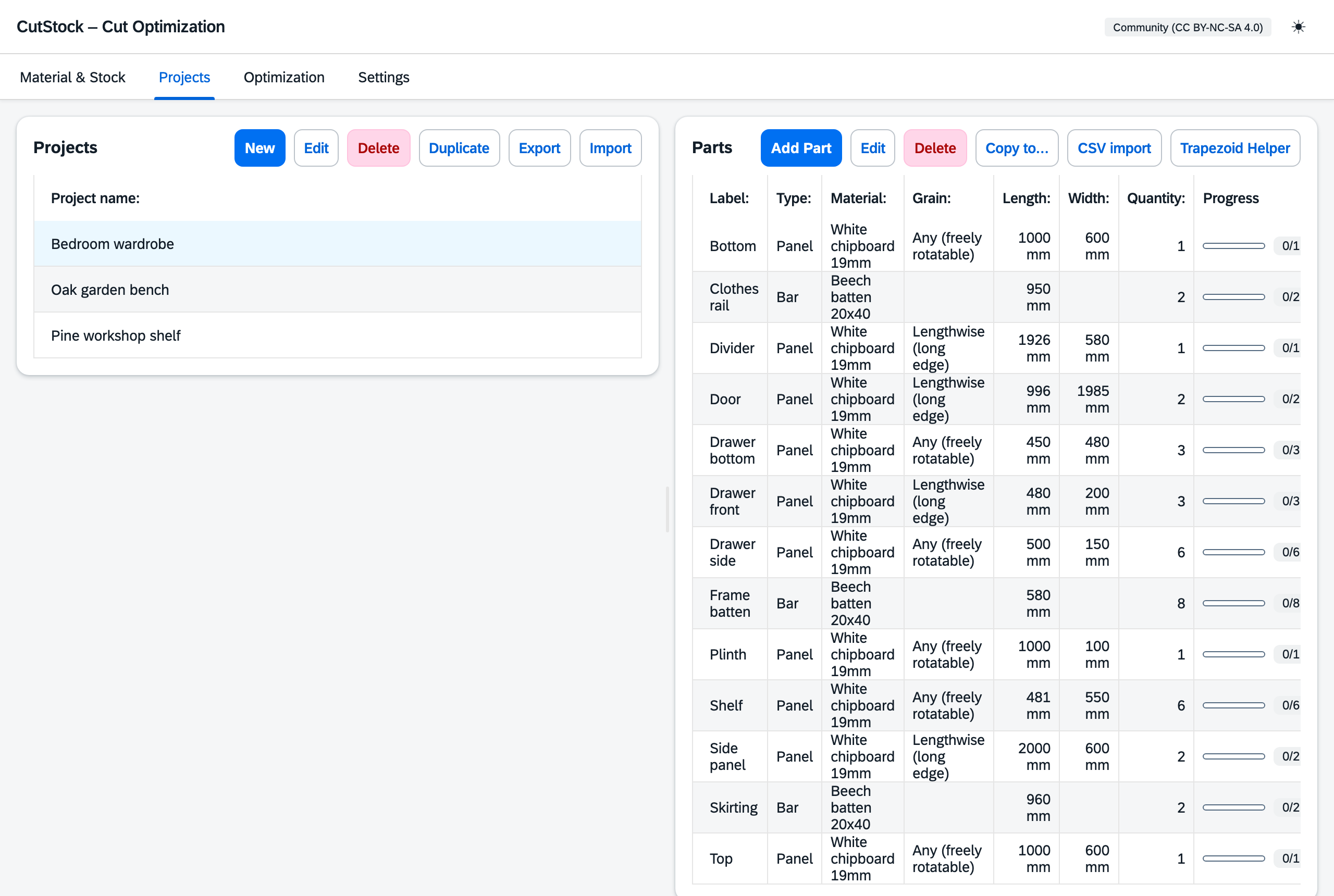
Organize parts by project — with label, material, dimensions, quantity and grain. Duplicate projects, copy parts into other projects and import lists via CSV or JSON. The progress bar shows what has already been cut.
Workshop Mode
Tablet next to the saw, workshop mode on: one panel per page, large touch targets, overall progress and an “Up next” marker. Every part you tick off updates progress and stock immediately.
Web App via Docker
The web app brings the same optimization core to any browser on your network — ideal for a NAS, home server, or Raspberry Pi (amd64 + arm64). All assets are bundled in the image; no internet connection is needed at runtime.
services:
  cutstock:
    image: ghcr.io/orohde/cutstock:latest
    container_name: cutstock
    restart: unless-stopped
    ports:
      - "8420:8000"
    volumes:
      - ./data:/data
    environment:
      - CUTSTOCK_DB=/data/cutstock.db
docker compose up -d — then CutStock is up at http://localhost:8420. Details in the guide on GitHub.
REST API
The web app exposes a full REST API under /api/. All endpoints accept and return JSON. If an API key is set, external programs send it as a Bearer token — the web UI and requests from the same machine need no key.
Endpoints (excerpt)
| Area | Endpoints |
|---|---|
| Materials | GET/POST/PUT/DELETE /api/materials |
| Stock | GET/POST/PUT/DELETE /api/stock, individual pieces, defects |
| Projects & Parts | GET/POST/PUT/DELETE /api/projects, /api/parts |
| Optimization | POST /api/optimize, /api/optimize/confirm |
| Export | POST /api/pdf, POST /api/labels |
| System | GET /api/version, /api/settings, backup/restore |
The complete endpoint list with examples is in the API documentation on GitHub.
Why Guillotine Cuts?
All CutStock algorithms use guillotine cuts — every cut runs completely from edge to edge. This is a deliberate choice:
| Approach | Material utilization | Remnants | Tools |
|---|---|---|---|
| Guillotine (CutStock) | ~85–95% | Always rectangular | Table saw, circular saw |
| Free-Cut | ~93–98% | L-shaped, T-shaped | CNC router required |
Guillotine cuts can be made with any standard saw. The remnants are always clean rectangles that can be stored and reused.
Technology
CutStock deliberately relies on a few proven open-source building blocks. Everything runs locally — no internet connection is needed at runtime.
| Library / tool | Used for |
|---|---|
| Python 3.12+ | Application logic and custom optimization algorithms (guillotine, nested guillotine, genetic algorithm) |
| FastAPI · Uvicorn · Pydantic | Web backend, REST API and data validation |
| SciPy (milp / HiGHS) | Exact bar optimization as an integer linear program (ILP) |
| reportlab | PDF generation: cut plans, parts lists, labels |
| cryptography | Ed25519-signed license keys |
| python-multipart | File uploads: material images, import, backup restore |
| SQLite | Local database in a single file — no database server; synced via iCloud Drive on macOS |
| SAP Fundamental Styles | Horizon design (light/dark) with the “72” typeface, fully bundled for offline use |
| Vanilla JavaScript · HTML5 Canvas | Framework-free UI, cut plans drawn on canvas |
| PyInstaller | Standalone desktop apps for macOS and Windows — they open CutStock in your default browser |
| Docker | Web app image for amd64 and arm64 (ghcr.io/orohde/cutstock) |
| pytest | Automated tests for the optimization core |
Download
Desktop app for macOS and Windows, web app as a Docker image (ghcr.io/orohde/cutstock). Source-available under the PolyForm Noncommercial 1.0.0 — free for private, non-commercial use.
Would you like to use CutStock in your business — in a joinery, cabinet shop, or workshop? A commercial license is available on request — contact details in the imprint.
Note: The desktop builds are not code-signed. macOS: right-click → Open. Windows: “More info” → “Run anyway”.
Request a Commercial License
Want to use CutStock in your business? Fill out the form and we will get back to you with a quote.